.png?width=300&height=76&name=Logo_Chromatic(Formerly%20Quil%20LG).png)
Previously, the bot joined at the scheduled start time with no way to adjust its arrival. With Bot Early Join Timing, you set a lead time that matches how your team actually runs meetings, whether that's joining right on time or arriving a few minutes early to make sure it's in the room before things get going.
How it works
You can set your bot to join anywhere from 0 to 10 minutes before a meeting's scheduled start:
- 0 minutes (join right at the scheduled time)
- 1 minute
- 2 minutes
- 3 minutes
- 5 minutes
- 10 minutes
Actual join time can still vary depending on the meeting platform's waiting room or lobby settings. If the host or platform blocks early entry, CoRecruit waits until it's allowed in.
Where to find it
Bot Early Join Timing lives in Settings → General, under the Bot Settings section, alongside your other bot behaviour controls like Bots Auto Join External Calls and Bots Auto Join Internal Calls.
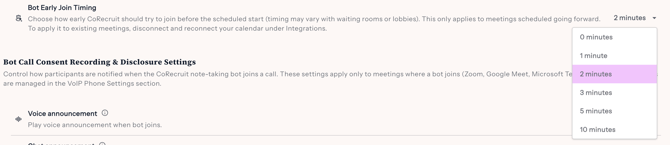
Setting your bot's early join timing
- Go to Settings and select General.
- Scroll to Bot Settings.
- Find Bot Early Join Timing and open the dropdown.
- Select your preferred lead time. CoRecruit saves your choice automatically.
Note: This setting only applies to meetings scheduled from this point forward. Meetings already on your calendar keep whatever join timing was in place when they were scheduled.
Applying the new timing to meetings you've already scheduled
If you want the new timing to apply to meetings that are already on your calendar, disconnect and reconnect your calendar:
- Go to Settings and select Integrations.
- Find your connected calendar and disconnect it.
- Reconnect the same calendar.
This re-syncs your existing meetings with your current Bot Early Join Timing setting.
Frequently asked questions
Why didn't the new timing apply to a meeting I already had scheduled?
Bot Early Join Timing only affects meetings scheduled after you change the setting. Meetings already on your calendar keep the timing that was active when they were originally scheduled. To update them, disconnect and reconnect your calendar under Integrations.
What happens if the meeting platform has a waiting room or lobby?
CoRecruit still tries to join at your selected lead time, but if the host or platform blocks early entry, the bot waits until it's allowed in.
Who can change this setting?
Access depends on your team's Role-Based Access Control (RBAC) permissions. Anyone with permission to manage General settings for your team — not only account owners — can update Bot Early Join Timing.
What are my options for how early the bot can join?
You can choose 0, 1, 2, 3, 5, or 10 minutes before the scheduled start.