.png?width=300&height=76&name=Logo_Chromatic(Formerly%20Quil%20LG).png)
Downloading the app
You can download the mobile app, along with CoRecruit's other companion apps, from within the CoRecruit web app:
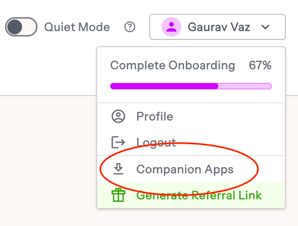
- Select your profile dropdown in the top right corner of the web app.
- Select Companion Apps.
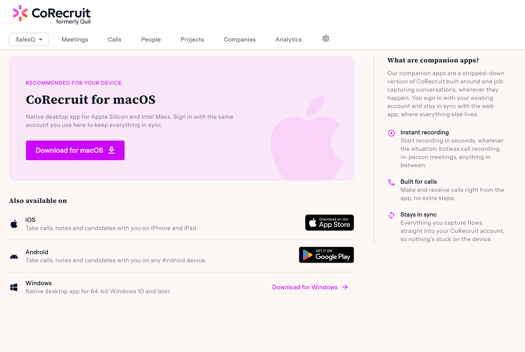
- On the Companion Apps page, select the iOS or Android link, depending on your device. Links to the macOS and Windows desktop apps are also available here.
- Sign in with your existing CoRecruit account.
Finding your way around
The bar at the bottom of the screen has three tabs.
| Tab | What it's for |
|---|---|
| Home | Start a recording, start a Conference call, and see your meetings for the day |
| Phone | Make calls, search your applicant tracking system (ATS) contacts, and review recent calls |
| Settings | Change your team, appearance, call preferences and permissions |
The app opens on Home. Your team name sits in the top right corner, and three shortcuts run across the top: Phone, Conference and Record. Below them, Today's meetings lists everything on your calendar for the day. Each meeting shows its start time and length, its name, where it's happening (for example, Zoom), who's attending, and a status such as Completed.
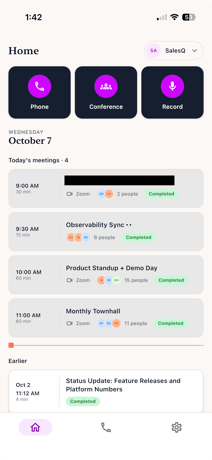
A red line marks the current time, so meetings above it have already happened and meetings below it are still to come. Scroll down to Earlier to see past meetings.
Recording a call with Conference
Conference records a call you're having on your phone's regular calling line, such as a call that comes in on your mobile number. CoRecruit calls you, you merge that call into your current one, and a CoRecruit bot joins the line so the conversation is captured in full quality.
Starting a Conference recording
- On Home, tap Conference.
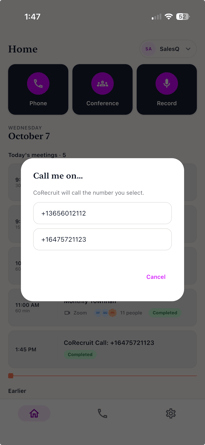
- In the Call me on... window, select the number you want CoRecruit to call.
- Answer the incoming call from CoRecruit.
- Use your phone's merge control to merge the CoRecruit call with the call you're already on.
Once the calls are merged, the CoRecruit bot is on the line and recording begins.
Like other meetings on CoRecruit, once the Conference call starts, you can set the Meeting Type and link a Contact Record for the call.
Note: Conference Me is for calls made through your phone's native calling app to your mobile number. To make and record calls from within CoRecruit itself, use the Phone tab instead.
Recording in person
Record captures audio through your phone's microphone. Use it when someone is sitting across from you
Warning: Record picks up whatever your phone's microphone hears. It can't capture the audio of a call held to your ear, so the other person's voice won't be recorded. For phone calls, use Conference.
Starting a recording
- On Home, tap Record.
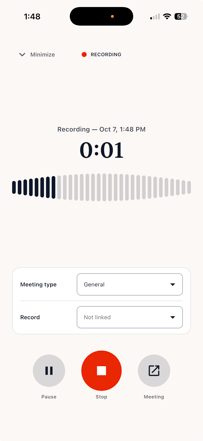
- CoRecruit opens the recording screen, shows a running timer and a live waveform, and starts recording.
- Next to Meeting type, choose the type of meeting you're recording from your team's list, or leave it as General.
- Next to Record, link the recording to a record, or leave it as Not linked.
Pausing, stopping and finishing
The recording screen has three controls along the bottom.
| Control | What it does |
|---|---|
| Pause | Pauses the recording until you resume it |
| Stop | Opens the Stop recording? window |
| Meeting | Opens the meeting for this recording |
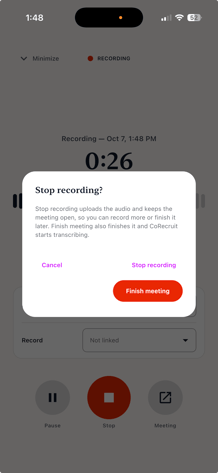
When you tap Stop, CoRecruit asks what you want to do:
- Stop recording uploads the audio and keeps the meeting open, so you can record more or finish it later.
- Finish meeting finishes the meeting, and CoRecruit starts transcribing.
- Cancel takes you back to the recording.
Warning: The Recorder captures whatever your phone's microphone picks up — it does not capture phone call audio directly. Don't use it to try to record a call you're holding to your ear; the other person's voice won't be captured. For phone calls, use Conference Me instead.
Making calls from the Phone tab
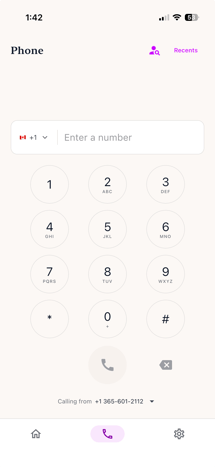
The Phone tab works like any phone dialler, with a few CoRecruit additions.
Dialling a number
Enter a number on the keypad. Use the country code dropdown to change the country, or type the full number with its country code and the flag updates to match. Tap the call button to dial.
Choosing which number you call from
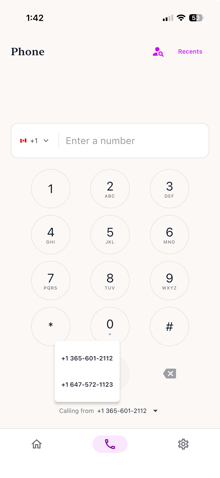
Below the keypad, Calling from shows the number your call will go out on. If your CoRecruit account has more than one number, tap it and select the one you want.
Searching your contacts
Tap the person-search icon in the top right corner to open the Search tab. Start typing a name and CoRecruit searches your ATS directly, so you can find someone and call them without typing their number.
Each result shows the person's name and email, a label showing whether they're a Candidate or a Contact (in ATSs that make that distinction), and every phone number on their record. Tap a number to call it. Tap Keypad in the top right corner to go back to the dialler.
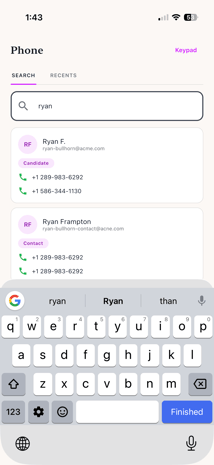
CoRecruit can now differentiate between the different types of contact records in your ATS. For instance, If you see a record that is stored in your ATS as both a Candidate and Contact, you will be able to see this in your search now.
This also helps you identify the correct person you are trying to call if there are multiple records with the same name.
Reviewing recent calls
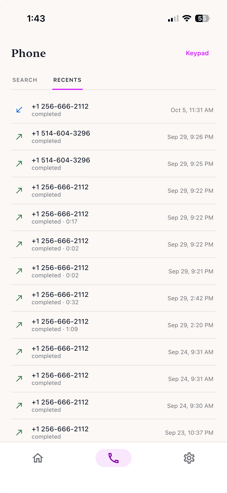
Tap Recents in the top right corner to see your call history. Each entry shows the number, an arrow for whether the call was incoming or outgoing, its status, its length, and when it happened. Tap Keypad to go back to the dialler.
Setting the meeting type and reviewing call details
While recording or during a call, you can easily see drop down selections for setting the Meeting Type and Participants.
Tap Meeting Type to choose from your team's list of meeting types, or leave it set to General.
Managing your settings
Open the Settings tab to change how the app works for you.
Account and team
Your name and email appear at the top. Use the Team dropdown to switch between teams.
Appearance
Choose System, Light or Dark. System follows your phone's light or dark setting.
Calls
- Quiet mode stops your phone from ringing for incoming calls on this device.
- Calling region sets where your calls connect. Automatic (lowest latency) picks the region closest to you. Choose a different region from the dropdown if you need to.
- Incoming calls tells you whether this device can receive calls. Each calling service is listed with a status of Connected or Couldn't connect.
Permissions
CoRecruit needs access to your microphone and notifications to work properly. This section shows the status of each.
- Setup checks shows Done once your microphone and notification tests have passed. Tap it to run the tests again.
- Microphone shows whether CoRecruit can use your microphone. It's needed to record meetings and to talk on calls.
- Notifications shows whether CoRecruit can send you notifications. They let your phone ring for incoming calls and show recording and upload progress.
- System settings for CoRecruit opens your phone's own settings for CoRecruit, where you can change any permission, notification or battery setting.
Support
App log holds the latest entries from the app on your device. Tap View to see them, or tap Share and then send them to support@corecruit.com so the team can diagnose a problem.
About and signing out
The About section shows your app version. Tap Open CoRecruit web to open the web app in your browser, or tap Sign out to sign out of the mobile app.
Reset
Clear app data signs you out and removes everything stored on your device: your preferences, your cached account, any recordings waiting to upload, and the app log.
Warning: Recordings that haven't finished uploading are removed when you clear app data. Wait for uploads to finish before you use it.
Frequently asked questions
What's the difference between Conference and Record?
Conference records a call on your phone's regular calling line by adding a CoRecruit bot to it. Record uses your phone's microphone, so it's meant for in-person conversations or calls on speakerphone.
Can I use Record to capture a phone call?
Only if the call is on speakerphone, because Record hears what your microphone hears and nothing else. For a normal phone call, use Conference.
What's the difference between Stop recording and Finish meeting?
Stop recording uploads your audio and leaves the meeting open, so you can record more or finish it later. Finish meeting closes the meeting, and CoRecruit starts transcribing it.
Can I choose which of my numbers a call goes out from?
Yes. On the Phone tab, tap the number next to Calling from and select the one you want.
Can I search my ATS contacts from my phone?
Yes. Tap the person-search icon on the Phone tab and search. You can call a contact straight from the results.
How do I stop my phone ringing for incoming calls?
Turn on Quiet mode in Settings. It applies to this device only.
How do I send the app's log to support?
Go to Settings, find App log under Support, and tap Share. The log goes to support@corecruit.com. Tap View first if you want to read it.
What happens if I tap Clear app data?
CoRecruit signs you out and removes everything stored on your device, including your preferences, your cached account, the app log, and any recordings still waiting to upload. Let your uploads finish first.
Why isn't my phone ringing for incoming calls?
Check Quiet mode in Settings and make sure it's off. Then check that Notifications under Permissions shows Allowed. If it doesn't, tap System settings for CoRecruit to turn notifications on.
Can I do everything in the mobile app that I can do in the web app?
No. The mobile app is built for capturing conversations wherever you are. Pipeline management, person records, reporting and full configuration stay in the web app.