.png?width=300&height=76&name=Logo_Chromatic(Formerly%20Quil%20LG).png)
How to Setup
Setup of the CoRecruit for Zoom Meetings integration requires only an active Zoom account with login details.
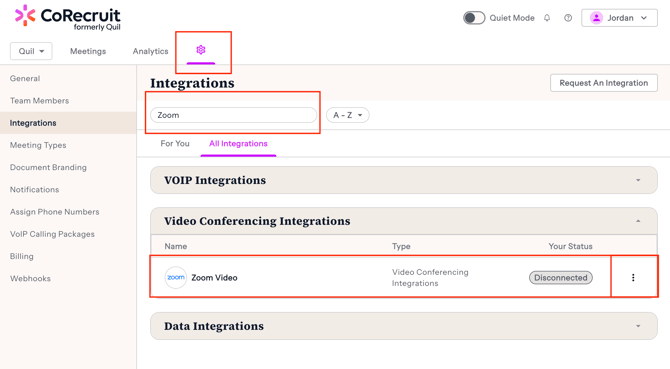
Navigate to the CoRecruit Integration page and select the "All Integrations" tab. Using the search bar, search for Zoom Video. Clicking overflow menu (three dots) you can then select "Connect"
Clicking "Connect" will prompt you to authenticate with Zoom. After the page loads back to CoRecruit, you will be integrated with Zoom.
 |
For more details on where to setup your integration please this article on managing you integrations
Using the Integration
After connecting your Zoom account, CoRecruit will be notified of any meetings that have been recorded and will process them. CoRecruit can only process meetings that have been recorded in Zoom.
For information on how to record meetings in Zoom, please refer to their documentation Recording Settings
Looking for CoRecruit for Zoom Phone? We have a separate app for that! To record Zoom Phone calls, please see CoRecruit for Zoom Phone
Meeting Processing
After a meeting has been received by CoRecruit, the data will be processed, linked, and uploaded your database records. When using the integration all database (ATS, CRM) records are linked via emails automatically.
Disconnecting the Integration
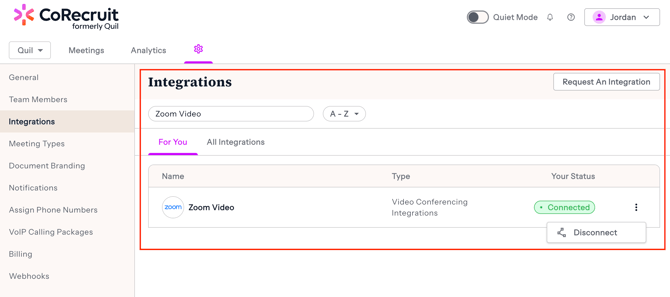
To disconnect the CoRecruit integration, please navigate to the CoRecruit integrations page. There you will see Zoom with options to either disconnect the integration.
 |
Still need help? Don't hesitate to reach out to us via support@corecruit.com for any questions.