.png?width=300&height=76&name=Logo_Chromatic(Formerly%20Quil%20LG).png)
Where the notes go
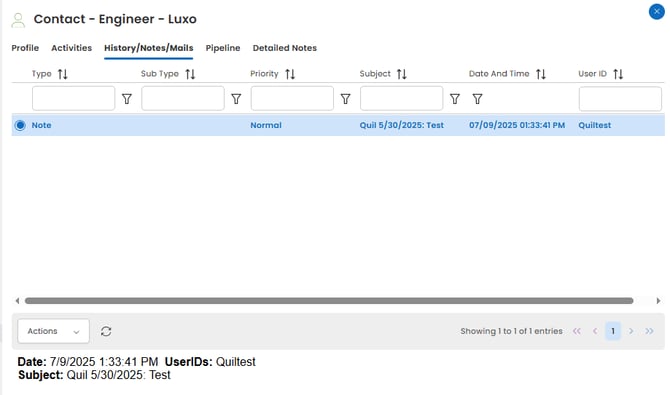
After notes are submitted, they will appear in the History/Notes/Mails section on the Candidate and Contact record you selected.
Editing a note after it has been submitted does not update it in Exelare.
How to Setup
Setup for the integration with Exelare requires your:
-
Company ID
-
Username
-
Password
This is the same login information you use to sign in to Exelare.
For more details on where to set up your integration please this article on managing your integrations
Activity Types Supported
❌ Activity Types are not supported in CoRecruit’s integration with Exelare.
There is no dropdown or manual configuration available.
Database Fields
✅ CoRecruit can update these standard Exelare Candidate fields automatically or manually:
-
Job Title,
-
Industry,
-
Bill Rate,
-
Pay Rate,
-
Employment Status.
Custom Fields
❌ Custom fields are not supported in CoRecruit’s Exelare integration.
Follow-Up Material
❌ Document uploads and follow-up material are not supported at this time.
Chrome Extension
❌ The Chrome extension is not available for Exelare.
Supported Features
| Feature | Supported |
|---|---|
| Create notes | ✅ Yes |
| Update notes | ❌ No |
| Activity types | ❌ No |
| Standard field updates | ✅ Yes |
| Custom field updates | ❌ No |
| Document uploads | ❌ No |
| Chrome extension | ❌ No |
Need Help?
For additional help with setting up or managing the Exelare integration, please contact your CoRecruit representative or reach out to support@corecruit.com