.png?width=300&height=76&name=Logo_Chromatic(Formerly%20Quil%20LG).png)
Not sure how to link records via CoRecruit? Please read this article on how to manually link records
Where The Notes Go
When submitted, notes will appear in the “Activities” or the "Notes" section on the Candidate record depending on your integration settings.
CoRecruit's PCRecruiter integration allows linking records with Candidates
How to Setup
For more details on where to setup your integration please read this article on managing your integrations
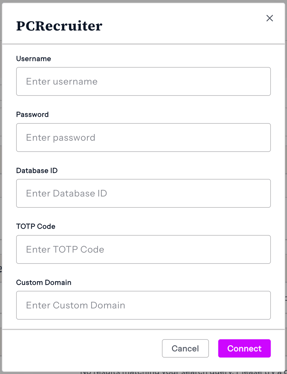
Setup for CoRecruit's integration with PCRecruiter now requires the following information:
Username: The username you use to login to PCR
Password: The password you use to login to PCR
Database ID: The database ID for your PCR instance.
Optional fields include:
TOTP Code (Authenticator Code): The two factor authentication code that you have enabled on your PCR account.
Custom Domain: The custom domain of your PCR
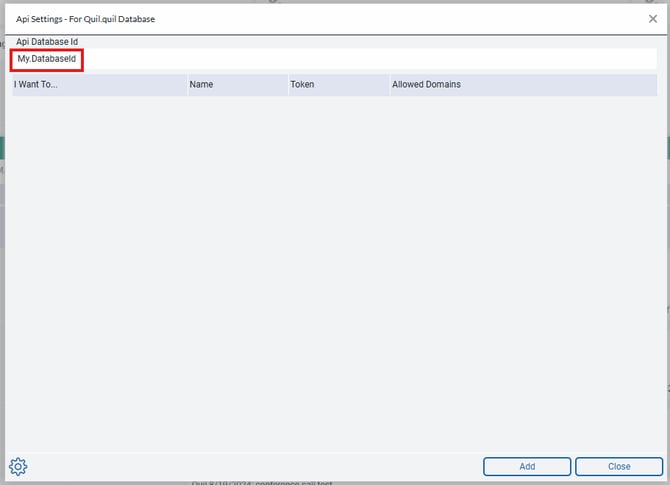
Finding Your Custom Domain and Database ID
You can find both your custom domain and Database ID in PCRecruiter by navigating to:
System → API → API Settings
You’ll need to enter this domain in CoRecruit’s integration setup page to complete the connection.
Once entered, CoRecruit will securely connect to your PCRecruiter account and begin syncing notes automatically.
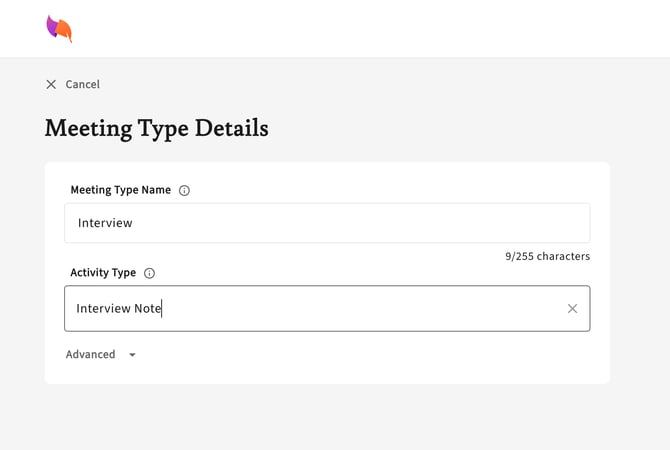
Activity Types Supported
PCRecruiter activity types are supported through CoRecruit. For each meeting type you are able to specify the activity type you would like your CoRecruit notes labeled with. When integrated with PCRecruiter, you can enter the activity type you wish to be applied to your database notes.
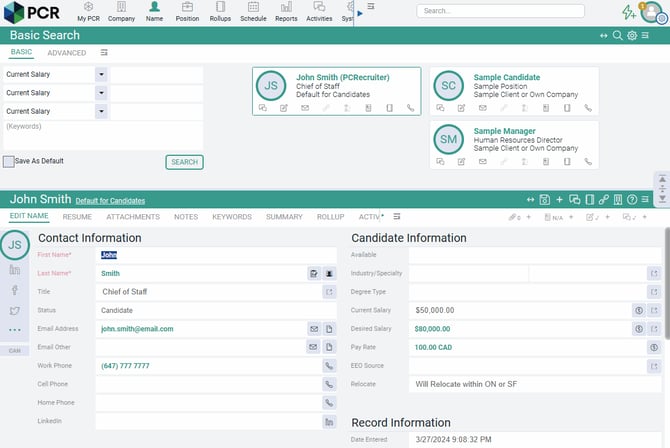
Database Fields
PCRecruiter Candidate fields can be updated automatically or manually via CoRecruit.
CoRecruit now supports both standard and custom fields. Fields are pulled directly from your PCRecruiter instance, meaning any supported custom fields you’ve configured will automatically appear as options in CoRecruit.
During or after your meeting, CoRecruit can fill in the following standard records, along with any mapped custom fields:
- Current Job Title
- Current Annual Salary
- Desired Annual Salary
- Relocation Preferences (Relocation Preferences is limited to 30 characters.)
Note Destinations
PCRecruit allows us the option to send notes to a Candidate's "Notes" and "Activities" section. Each user can customize their integration have database notes sent to "Activity", "Note" or both "Activity and Note".
This can be configured via the integration's configuration menu.
If you edit an activity after submitting it, CoRecruit replaces it in PCRecruiter. Notes are updated in place.
PCRecruiter has a user setting to "Auto Write Activities when adding notes". This can cause confusion when Note Destination is set to either "Note" or "Activity and Note" since it will automatically create a second record that CoRecruit can not update.
We recommend disabling this and using "Activity and Note" instead.
Document Upload
✅ Follow-up materials such as summaries or documents can be uploaded to records in PCRecruiter.
Supported Features table
| Feature | Supported |
|---|---|
| Create notes | ✅ Yes |
| Update notes | ⚠️ Partial — Editing an activity replaces it; notes update in place |
| Activity types | ⚠️ Partial — Entered as text (no dropdown) |
| Standard field updates | ✅ Yes |
| Custom field updates | ✅ Yes |
| Document uploads | ✅ Yes |
| Chrome extension | ✅ Yes |